
Skip to content

We rebuilt SOTF Mods. Log in again with the same password.

  • Cover image of Axel's Mod Menu

Sons of the Forest Mod loader: RedLoader

Axel's Mod Menu v1.3.8

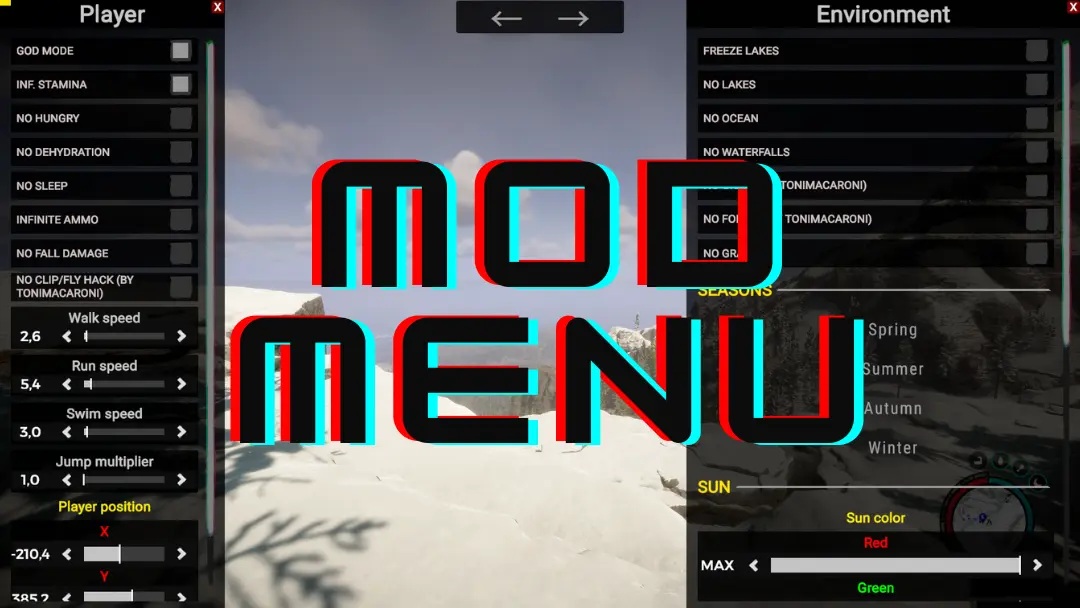
Featurefull mod menu for Sons of The Forest

ImAxel Trusted Other

  • 121K 121,167 Downloads
  • 9 followers

Description

Warning

Needs my SonsAxLib v1.2.0+ library to work, download it here: https://sotf-mods.com/mods/imaxel/sonsaxlib

How to use

Default opening key is insert key. It can be changed from the mods settings.

Showcase video: https://youtu.be/OIoCRpvJtUI

Dependencies

Versions and changelog

All 20 versions
  1. v1.3.8 Latest Fixed noclip causing issues with riding ziplines and character physics override · 22.4K downloads
  2. v1.3.7 Fixed saved daytime speed not applying on game start · 72.4K downloads
  3. v1.3.6 Daytime speed will now also be saved upon game restart if "save settings" is enabled · 14 downloads
  1. v1.3.8

    Latest

    Fixed noclip causing issues with riding ziplines and character physics override

  2. v1.3.7

    Fixed saved daytime speed not applying on game start

  3. v1.3.6

    Daytime speed will now also be saved upon game restart if "save settings" is enabled

10 comments

  1. sonofaforest

    The mod menu works fine for me. Very helpful mod, as it allows changing values for movement speed, noclip (speed), flashlight strenght and range, battery drain, and much more. Thanks for sharing!

  2. euribeiiro

    I installed it through RedManager, entered the game, and nothing activates. I press the key, and nothing happens.

  3. ch1mpthep1mp

    yo why is the spawn characters different from the vid cause all the names on spawning npc's is mostly wrong like heavy cannibal is heavy male any way you can fix that

Something not working? Share your log and paste the link in your comment.

Reviews

No reviews yet. Be the first to review this mod.

Write a review

Log in · One review per user. Be specific: version, what worked, what didn’t.

How to install this mod

These steps install Axel's Mod Menu by hand, without a manager.

RedManager installs and updates mods and their dependencies for you. Get RedManager

This mod needs RedLoader, not BepInEx. BepInEx mods and guides don’t apply to Sons of the Forest.

  1. Install RedLoader

    RedLoader is the mod loader for Sons of the Forest. You only need to install it once.

    How to install RedLoader
  2. Install its dependencies first

  3. Download Axel's Mod Menu v1.3.8

    Download v1.3.8
  4. Extract the ZIP into the Mods folder

    On your PC, extract it into the game’s Mods folder:

    Steam/steamapps/common/Sons Of The Forest/Mods

    Keep the folder structure of the ZIP. Don’t put the ZIP itself in the folder.

  5. Launch the game

    RedLoader loads the mod on start. Press F1 in the main menu to see the list of mods.

Full install guide

You also need SonsAxLib

Axel's Mod Menu doesn’t work without these mods. Download them too, or continue if you already have them.

More actions

Share this mod

Badges for your page

Paste a badge into a README, forum post or Discord. Badges update automatically.

Downloads badge: Axel's Mod MenuVersion badge: Axel's Mod MenuCompatibility badge: Axel's Mod MenuRating badge: Axel's Mod Menu
QR code

Scan it with your phone to open the page.

Report Axel's Mod Menu

Tell the moderators what’s wrong. Reports are private.

Reason

Links, versions or anything that helps the moderators. Up to 2,000 characters.

Changelog

Comments

Reviews