
Skip to content

We rebuilt SOTF Mods. Log in again with the same password.

  • Cover image of Golf Cart Battery Upgrade

Sons of the Forest Mod loader: RedLoader

Golf Cart Battery Upgrade v0.1.8

Install one Golf Cart Battery on a golf cart for twice its energy capacity. Saves per cart. Single player.

antman Vehicles & Movement

  • 2 2 Downloads
  • 0 followers

Description

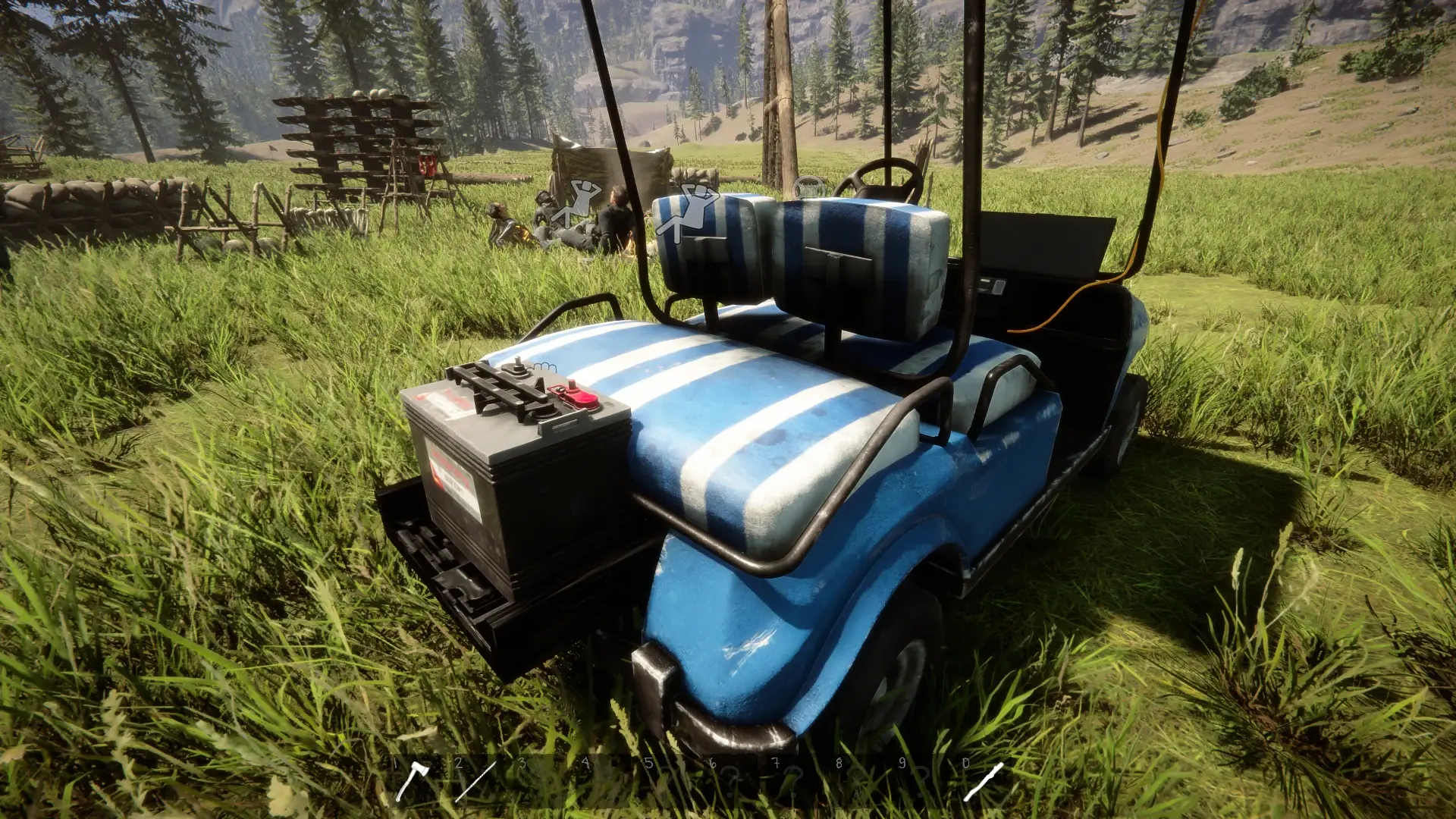
Give your golf cart double its normal battery capacity by installing one extra Golf Cart Battery. The extra battery arrives fully charged, helping you travel farther between charges.

Features

  • 200% battery capacity with one upgrade per golf cart.
  • Charged extra battery: preserves your existing charge and adds a full battery’s worth of energy.
  • Visible battery and holder using the game’s original battery model and textures.
  • Saved per cart: upgrade status and remaining charge persist when saving and reloading.
  • Adjustable placement: fine-tune the holder’s X, Y and Z position through the mod settings.
  • Retains normal driving performance, power consumption and solar-charging rates.

How to use

  1. Carry one Golf Cart Battery in your inventory.
  2. Look directly at the battery holder near the cart’s rear bumper.
  3. Hold E—or your rebound Interact key—for one second to install it.

One battery is consumed. The installed battery becomes visible, and the cart’s maximum energy capacity doubles.

Aim at the installed battery to view its charge. Normal pushing and seat interactions remain available.

Settings

Open MODS → Golf Cart Battery Upgrade to adjust the holder’s position.

Changes apply live to all carts, including the battery and interaction prompt. Values are in metres: 0.01 = 1 cm.

Requirements and known limits

  • Requires RedLoader.
  • Single-player only. Multiplayer is not supported.
  • Each cart accepts one upgrade.
  • Solar charging retains its normal rate, so charging the doubled capacity from empty takes longer.
  • Keep the mod installed to retain the extra capacity.

Fully close the game before installing or updating.

Versions and changelog

All 2 versions
  1. v0.1.8 Latest Changes since v0.1.4 Adjustable solar charging speed: choose 1%–10,000% in the mod settings. Default is 100%; maximum is 100× normal charging speed. Charging-speed changes apply live to golf carts, including existing upgrades. Normal daylight conditions still apply. Improved save-load protection: battery upgrades and remaining charge are read independently if another mod’s save reader interrupts loading. Added an immediate charge snapshot before saving. Existing upgrades and saved settings remain compatible. Fully close the game before replacing the mod files. · 49.4 kB · 0 downloads
  2. v0.1.4 First release · 45.2 kB · 2 downloads
  1. v0.1.8

    Latest 49.4 kB

    Changes since v0.1.4

    Adjustable solar charging speed: choose 1%–10,000% in the mod settings. Default is 100%; maximum is 100× normal charging speed.

    Charging-speed changes apply live to golf carts, including existing upgrades. Normal daylight conditions still apply.

    Improved save-load protection: battery upgrades and remaining charge are read independently if another mod’s save reader interrupts loading.

    Added an immediate charge snapshot before saving.

    Existing upgrades and saved settings remain compatible.

    Fully close the game before replacing the mod files.

  2. v0.1.4

    45.2 kB

    First release

Comments

No comments yet. Questions, tips and bug reports go here.

Something not working? Share your log and paste the link in your comment.

Reviews

No reviews yet. Be the first to review this mod.

Write a review

Log in · One review per user. Be specific: version, what worked, what didn’t.

How to install this mod

These steps install Golf Cart Battery Upgrade by hand, without a manager.

RedManager installs and updates mods and their dependencies for you. Get RedManager

This mod needs RedLoader, not BepInEx. BepInEx mods and guides don’t apply to Sons of the Forest.

  1. Install RedLoader

    Use RedLoader 0.8.6 or newer.

    How to install RedLoader
  2. Download Golf Cart Battery Upgrade v0.1.8

    Download v0.1.8
  3. Extract the ZIP into the Mods folder

    On your PC, extract it into the game’s Mods folder:

    Steam/steamapps/common/Sons Of The Forest/Mods

    Keep the folder structure of the ZIP. Don’t put the ZIP itself in the folder.

  4. Launch the game

    RedLoader loads the mod on start. Press F1 in the main menu to see the list of mods.

    Multiplayer: Solo only.

Full install guide

More actions

Share this mod

Badges for your page

Paste a badge into a README, forum post or Discord. Badges update automatically.

Downloads badge: Golf Cart Battery UpgradeVersion badge: Golf Cart Battery UpgradeCompatibility badge: Golf Cart Battery UpgradeRating badge: Golf Cart Battery Upgrade
QR code

Scan it with your phone to open the page.

Report Golf Cart Battery Upgrade

Tell the moderators what’s wrong. Reports are private.

Reason

Links, versions or anything that helps the moderators. Up to 2,000 characters.

Unapprove Golf Cart Battery Upgrade?

It goes back to Pending approval: it leaves the main list and returns to the New mods queue.

Changelog

Comments

Reviews