跳到主要内容
登录

SOTF Mods 已全面重建。请重新登录,密码保持不变。

Load Screen Music 的封面图

Load Screen Music

在加载屏幕期间播放音频文件,并可以更改主菜单音乐

自动翻译

ImAxel Other 版本:v1.2.1 更新于 2023年10月17日

下载量
1,577 总计
本周下载量
本周 6
关注者
0 位关注者
未验证 尚未在最新补丁上验证。试过了吗?告诉我们结果。 报告是否可用

概览

How to use

  1. Once the DLL and folder is in your Mods folder, open up the "LoadingScreenMusic" folder.
  2. Inside the folder, (where the manifest file is visible) there is an Audios folder.
  3. Inside the Audios folder, drop any of your audio files (.mp3, .wav).
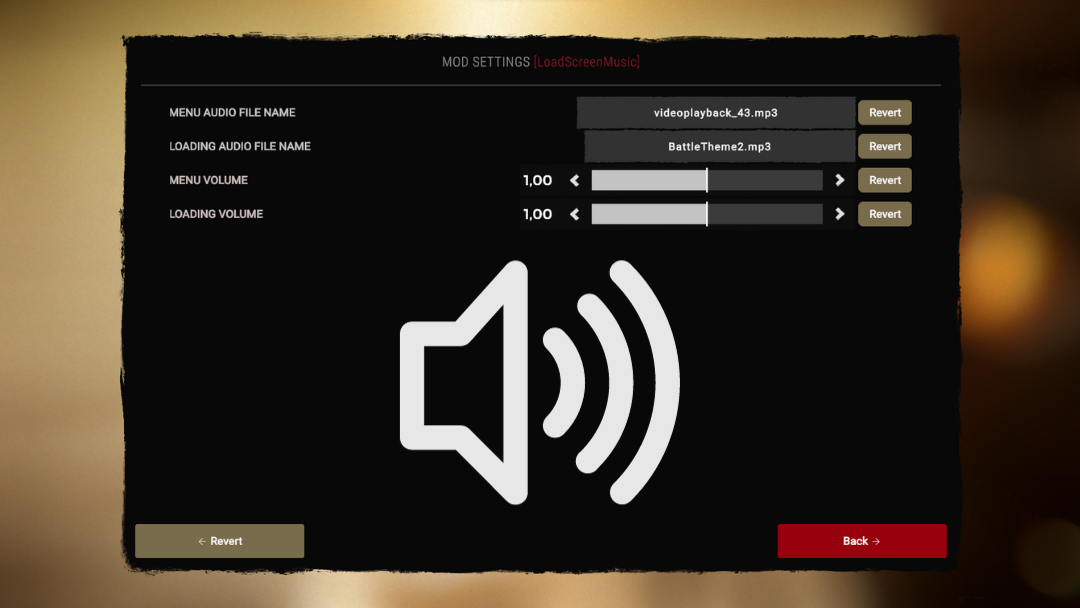
  4. Start Sons and open the Mods tab and click on LoadScreenMusic settings.
  5. Enter the exact file name of your .mp3 or .wav into either Menu audio or Loading audio (make sure to include the file type in the name e.g myfile.mp3).
  6. Restart Sons and the music should play

    (OPTIONAL) To get rid of the original theme playing for the first couple seconds, go to muted_sounds in _RedLoader.cfg (Game folder -> UserData -> _RedLoader.cfg).
    Enter in this value and save:

    muted_sounds = [ "event:/SotF_Music/mx_endnightsting", "event:/SotF_Music/Main Theme/Main_Theme" ]
  1. v1.2.1

    最新

    fixed menu audio not playing if loading audio was empty

  2. v1.2.0

    Added an option to stop helicopter sound

  3. v1.1.3

    fixed menu audio duplicating when exiting options menu, prevented infinite audio loop in some cases

评价

还没有评价。下载过了吗?来当第一个分享体验的人。

写评价

登录 · 每位幸存者一条评价。请具体说明:版本、哪些能用、哪些不能用。

评论

还没有评论。提问、技巧和 bug 反馈都可以写在这里。

常见问题

Load Screen Music 支持多人游戏吗?
作者尚未说明是否支持多人游戏。可以看看评论和其他玩家的实测报告。
如何安装 Load Screen Music?
先安装 RedLoader(RedManager 可以帮你完成),在本页下载 Load Screen Music 1.2.1,放进游戏目录中的 _RedLoader/Mods 文件夹。启动游戏后按 F1,确认它已经加载。
Load Screen Music 需要什么?
只需要 Steam 版 Sons of the Forest 和 RedLoader,没有其他依赖。
Load Screen Music 在当前游戏补丁上能用吗?
还没有兼容性报告。如果你试过,请提交一份实测报告。

速览

游戏版本
未验证
RedLoader
未声明
平台
未知
多人游戏
未知
专用服务器
未知
存档中途移除
未知
前置
无
冲突
暂无已知冲突
版本
1.2.1
更新于
发布于

实地报告

报告

还没有实地报告。试过了吗?来反馈一下。

在你的游戏里能用吗?

实地报告只需十秒,就能让大家知道此模组在当前补丁下是否可用。

登录后提交实地报告

如何安装此模组

五分钟搞定,无需管理器。以下步骤适用于 Load Screen Music。

此模组需要 RedLoader,而不是 BepInEx。BepInEx 的模组和教程不适用于 Sons of the Forest。

  1. 安装 RedLoader

    RedLoader 是 Sons of the Forest 的模组加载器。安装一次,所有模组都能用。

    如何安装 RedLoader
  2. 下载 Load Screen Music v1.2.1

    下载 v1.2.1
  3. 把 ZIP 解压到 Mods 文件夹

    在电脑上,解压到游戏的 Mods 文件夹:

    Steam/steamapps/common/Sons Of The Forest/Mods

    保持 ZIP 内的文件夹结构,不要把 ZIP 文件本身放进文件夹。

  4. 启动游戏

    RedLoader 会在启动时加载模组。在主菜单按 F1 查看模组列表。

想一键搞定?RedManager 可以替你安装和更新模组及其前置。

完整安装指南

分享此模组

页面徽章

可将徽章粘贴到 README、论坛或 Discord,会自动更新。

下载量徽章:Load Screen Music版本徽章:Load Screen Music兼容性徽章:Load Screen Music评分徽章:Load Screen Music
二维码

用手机扫描即可打开页面。

举报 Load Screen Music

告诉护林员哪里有问题。举报内容不公开。

原因

链接、版本或任何能帮助护林员的信息,最多 2000 个字符。