
Skip to content

We rebuilt SOTF Mods. Log in again with the same password.

  • Cover image of Load Screen Music

Sons of the Forest Mod loader: RedLoader

Load Screen Music v1.2.1

Play an audio file during loading screen and can change the main menu music

ImAxel Trusted Other

  • 1.67K 1,665 Downloads
  • 0 followers

Description

How to use

  1. Once the DLL and folder is in your Mods folder, open up the "LoadingScreenMusic" folder.
  2. Inside the folder, (where the manifest file is visible) there is an Audios folder.
  3. Inside the Audios folder, drop any of your audio files (.mp3, .wav).
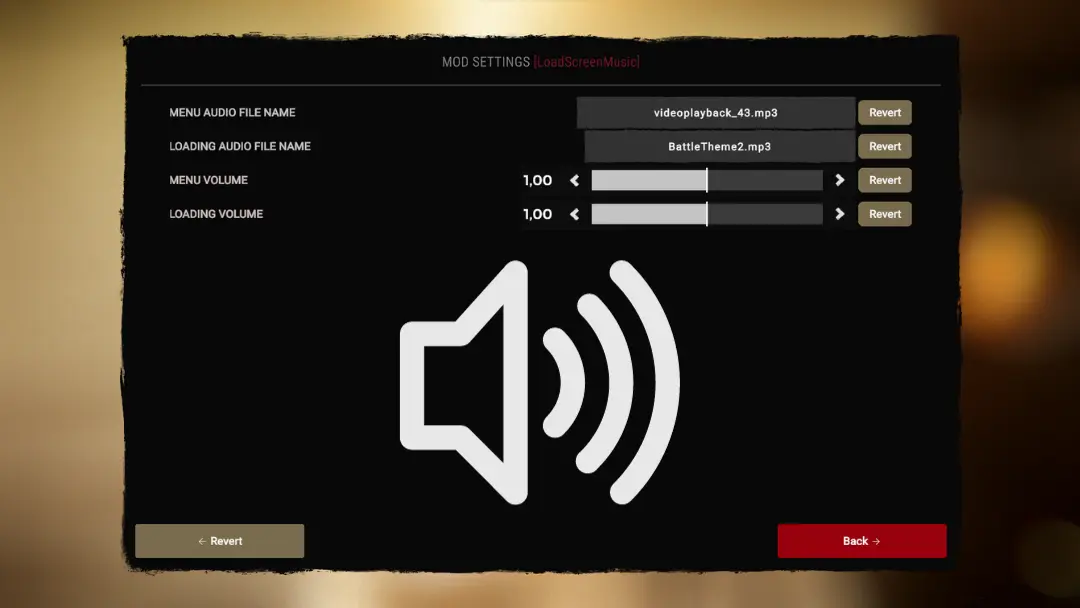
  4. Start Sons and open the Mods tab and click on LoadScreenMusic settings.
  5. Enter the exact file name of your .mp3 or .wav into either Menu audio or Loading audio (make sure to include the file type in the name e.g myfile.mp3).
  6. Restart Sons and the music should play

(OPTIONAL) To get rid of the original theme playing for the first couple seconds, go to muted_sounds in _RedLoader.cfg (Game folder -> UserData -> _RedLoader.cfg).
Enter in this value and save:

muted_sounds = [ "event:/SotF_Music/mx_endnightsting", "event:/SotF_Music/Main Theme/Main_Theme" ]

Versions and changelog

All 7 versions
  1. v1.2.1 Latest fixed menu audio not playing if loading audio was empty · 1.61K downloads
  2. v1.2.0 Added an option to stop helicopter sound · 9 downloads
  3. v1.1.3 fixed menu audio duplicating when exiting options menu, prevented infinite audio loop in some cases · 10 downloads
  1. v1.2.1

    Latest

    fixed menu audio not playing if loading audio was empty

  2. v1.2.0

    Added an option to stop helicopter sound

  3. v1.1.3

    fixed menu audio duplicating when exiting options menu, prevented infinite audio loop in some cases

Comments

No comments yet. Questions, tips and bug reports go here.

Something not working? Share your log and paste the link in your comment.

Reviews

No reviews yet. Be the first to review this mod.

Write a review

Log in · One review per user. Be specific: version, what worked, what didn’t.

How to install this mod

These steps install Load Screen Music by hand, without a manager.

SotF Mods Manager installs and updates mods and their dependencies for you. Get SotF Mods Manager

This mod needs RedLoader, not BepInEx. BepInEx mods and guides don’t apply to Sons of the Forest.

  1. Install RedLoader

    RedLoader is the mod loader for Sons of the Forest. You only need to install it once.

    How to install RedLoader
  2. Download Load Screen Music v1.2.1

    Download v1.2.1
  3. Extract the ZIP into the Mods folder

    On your PC, extract it into the game’s Mods folder:

    Steam/steamapps/common/Sons Of The Forest/Mods

    Keep the folder structure of the ZIP. Don’t put the ZIP itself in the folder.

  4. Launch the game

    RedLoader loads the mod on start. Press F1 in the main menu to see the list of mods.

Full install guide

More actions

Share this mod

Badges for your page

Paste a badge into a README, forum post or Discord. Badges update automatically.

Downloads badge: Load Screen MusicVersion badge: Load Screen MusicCompatibility badge: Load Screen MusicRating badge: Load Screen Music
QR code

Scan it with your phone to open the page.

Report Load Screen Music

Tell the moderators what’s wrong. Reports are private.

Reason

Links, versions or anything that helps the moderators. Up to 2,000 characters.

Unapprove Load Screen Music?

It goes back to Pending approval: it leaves the main list and returns to the New mods queue.

Changelog

Comments

Reviews