Stick Reinforcement Colors#
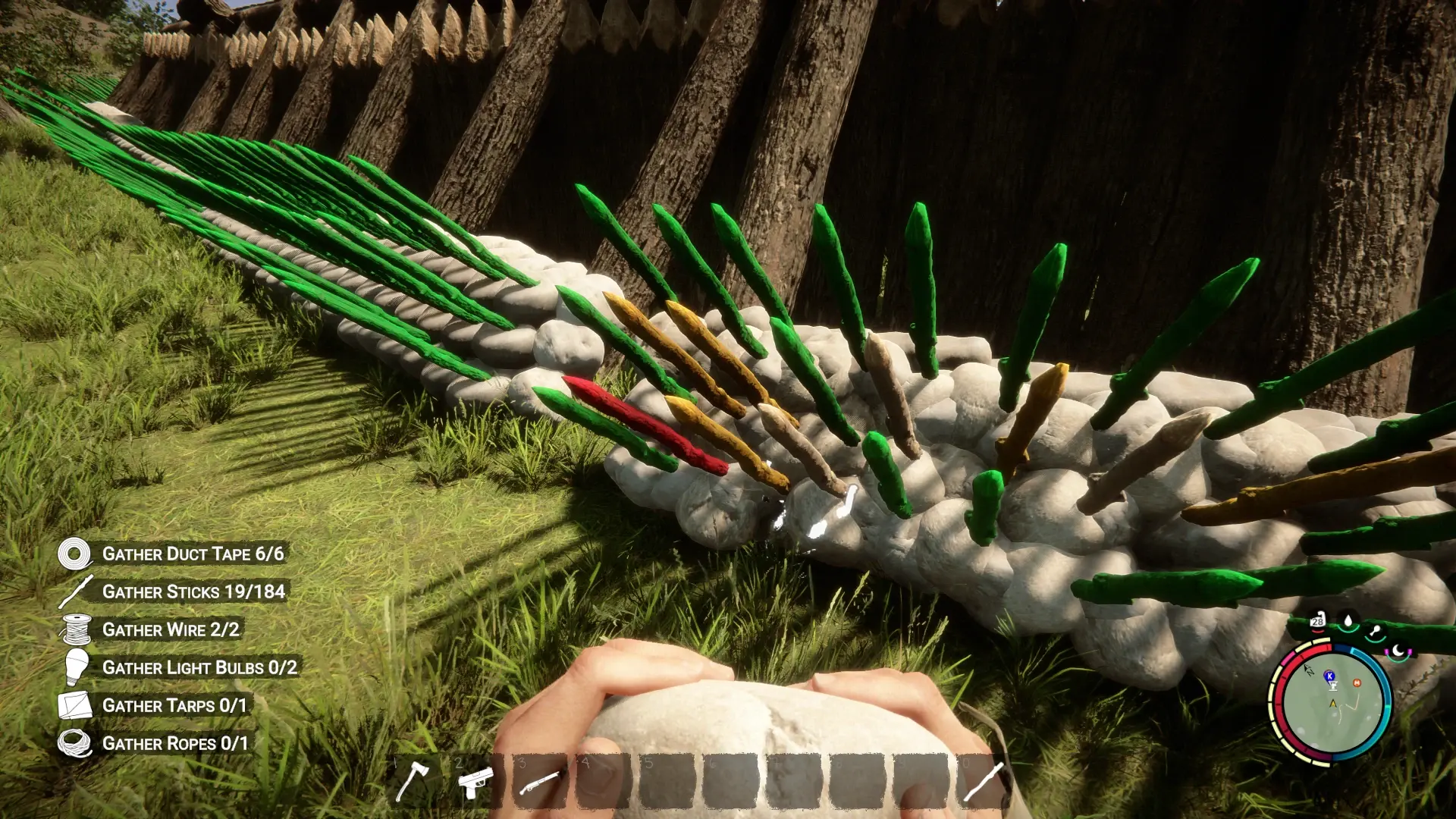
See how many reinforcing rocks your placed sticks have at a glance. The stick changes color as you add rocks, making unfinished reinforcement easier to spot around your base.
| Reinforcing rocks |
Stick appearance |
| 0 |
Original wood |
| 1 |
Reddish |
| 2 |
Yellow |
| 3 |
Greenish |
Features#
- Supports upright stick posts and sharpened defensive sticks.
- Preserves the wood texture beneath the tint.
- Checks existing sticks after loading a save.
- Updates colors when reinforcing rocks are added or removed.
- Includes an on/off toggle and a customizable shortcut—F4 by default.
- Uses cached background checks and shared tint materials to reduce processing and material duplication.
This is a visual aid for checking reinforcement. Stick strength, durability, and building costs follow the game’s normal behavior.
Requirements#
RedLoader — built against version 0.8.6.
Installation#
- Close the game.
- Extract the ZIP’s Mods folder into your game folder, beside
SonsOfTheForest.exe.
- Launch through RedLoader and load a save.
When updating, overwrite the existing StickReinforcementColors files.
How to use#
Place an upright stick and add reinforcing rocks. Its tint shows the current reinforcement level.
Press F4 to switch the effect off or on. Switching it off restores the original appearance and stops background checks.
In-game settings#
Open Pause → MODS → Stick Reinforcement Colors → Settings.
- Enable color effect: turn the visualization on or off.
- Toggle key: click the current binding and press your preferred key.
- Refresh interval: increase it for less frequent checks and slower updates.
- Background work budget: lower it to reduce background work per frame.
Known issues and limitations#
- Colors can take a few seconds to update, particularly after loading, enabling the effect, or checking large bases.
- Some special stick variants, shaders, or distant combined meshes may not show the tint.
- Other mods that modify the same materials may interfere.
- The latest performance changes and multiplayer behavior need further in-game testing.
For bug reports, include _RedLoader\Latest.log, the stick type, and the number of reinforcing rocks.
Created by Ibrahim, with development from ChatGPT (OpenAI).

Comments
No comments yet. Questions, tips and bug reports go here.
Something not working? Share your log and paste the link in your comment.
Log in to comment