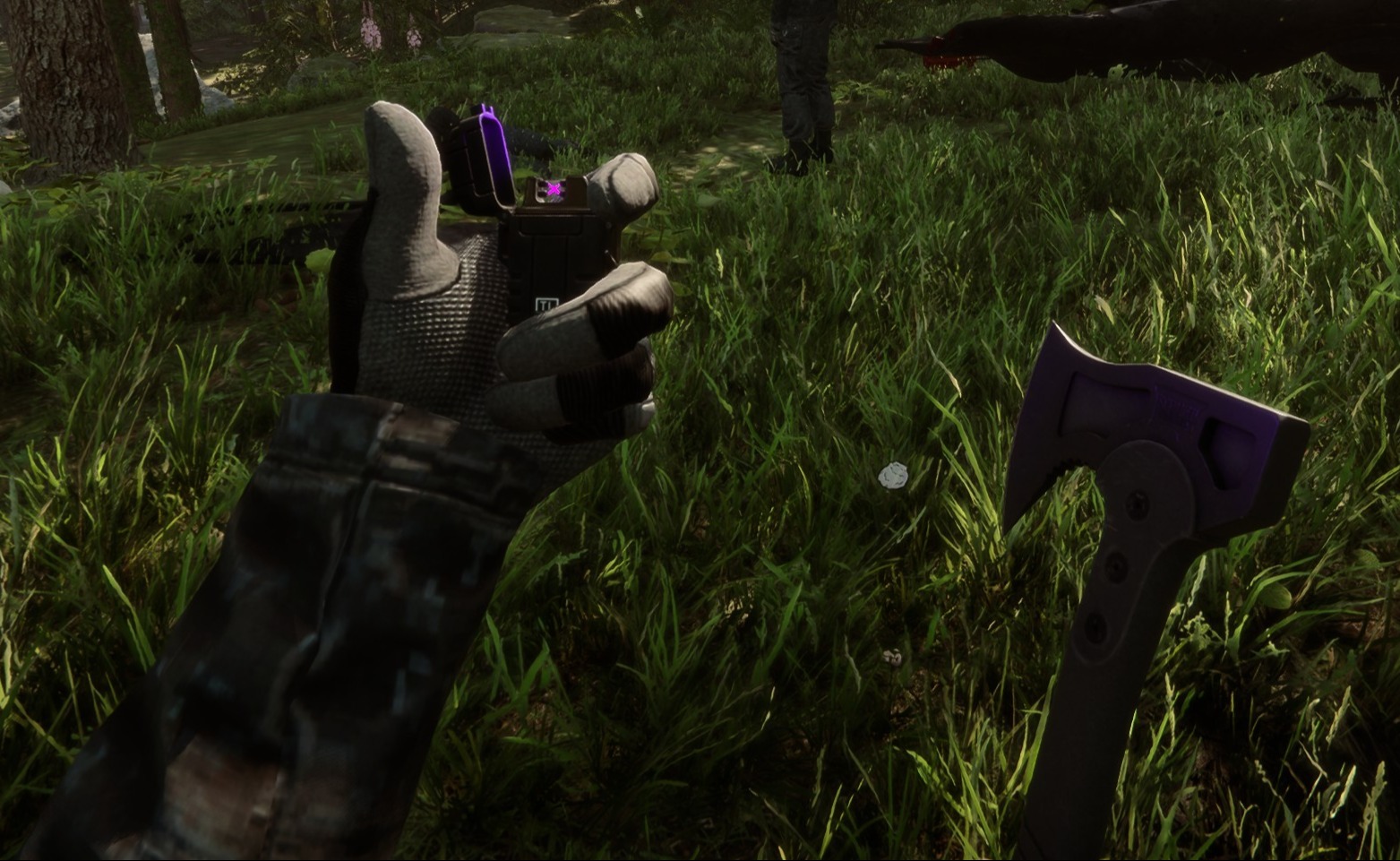
Tactical Gear Mod
Este mod configurable del lado del cliente añade equipo táctico a ti y a cualquier otro jugador de tu partida.
This configurable client-side mod adds tactical gear to you and any other players in your game.
Traducido automáticamente
clairenheit1367 Model Swap Versión:v1.1.6 Actualizado el 28 dic 2025
- Descargas
- 16.021 en total
- Descargas esta semana
- 169 esta semana
- Seguidores
- 2 seguidores
Descargar v1.1.6
Otras versiones
Cliente · Solo el host Ver todo
Resumen
Notas de campo
Las 21 versionesReseñas
Aún no hay reseñas. ¿Lo descargaste? Sé el primero en contar qué tal.
Escribir una reseña
Iniciar sesión · Una reseña por superviviente. Sé concreto: versión, qué funcionó y qué no.
Preguntas frecuentes
- ¿Tactical Gear Mod funciona en multijugador?
- Sí, pero solo el anfitrión tiene que instalarlo; los demás jugadores pueden unirse sin él.
- ¿Cómo se instala Tactical Gear Mod?
- Instala RedLoader (RedManager puede hacerlo por ti), descarga Tactical Gear Mod 1.1.6 desde esta página y ponlo en la carpeta _RedLoader/Mods dentro del directorio del juego. Abre el juego y pulsa F1 para comprobar que cargó.
- ¿Qué necesita Tactical Gear Mod?
- Solo Sons of the Forest en Steam y RedLoader. No tiene otras dependencias.
- ¿Tactical Gear Mod funciona con el parche actual del juego?
- Todavía no hay informes de compatibilidad. Si lo pruebas, añade un informe de campo.
De un vistazo
- Build del juego
- Sin verificar
- RedLoader
- Sin declarar
- Plataforma
- Cliente
- Multijugador
- Solo el host
- Servidor dedicado
- Desconocido
- Quitar a mitad de partida
- Desconocido
- Dependencias
- Ninguno
- Conflictos
- Ninguno conocido
- Versión
- 1.1.6
- Actualizado
- Publicado
Reportes de campo
ReportarAún no hay reportes de campo. ¿Lo has probado? Cuéntalo.
¿Te funcionó en tu partida?
Un reporte de campo lleva diez segundos y dice a todos si este mod funciona en el parche actual.
Inicia sesión para añadir un reporte de campo
14 comentarios
Hello Herds, the settings are available in the main menu on the "Mods" option, not in file explorer.
I might be super stupid, but i cant find the settings in my file explorer to configurate the mod. can someone please help me
i I'm having a problem with the mod. When I save the game, exit, and re-enter, the mod stops working (the hands and clothing aren't visible, only the default game gear, and Kevin doesn't have his helmet or anything equipped). I don't know if anyone else has experienced this or is currently experiencing the same issue.
Oma, it's a 1 click install using RedModManager
Can you please explain how to install the mod?
The gloves were not designed for the player and required some unconventional fixes to make replace the player hands. The player hands are two meshes, one for each while the gloves are one mesh for both and do not include forearms. The gloves work best with the "old" jacket, as the new one is designed around the gloveless hands. You'll notice the old jacket option forces gloves on co-op players, as otherwise the forearms will violently clip with it.
wrists are invisible on other clothing when gloves are in use.
sleeves are thinner than usual, and taking off the gloves will result in the thin sleeves clipping through the normal player arms.
nvm fixed it by uninstalling all other mods. the mod is great althru gloves could be rigged bit better for less clipping
it does not work for me (
it makes my hands invisible
R0xxier0cks, the helmet and balaclava are set to cast shadows only for the local player as otherwise they would obstruct your camera view. The free-camera option is a debug tool and doesn't override this
Inicia sesión para comentar