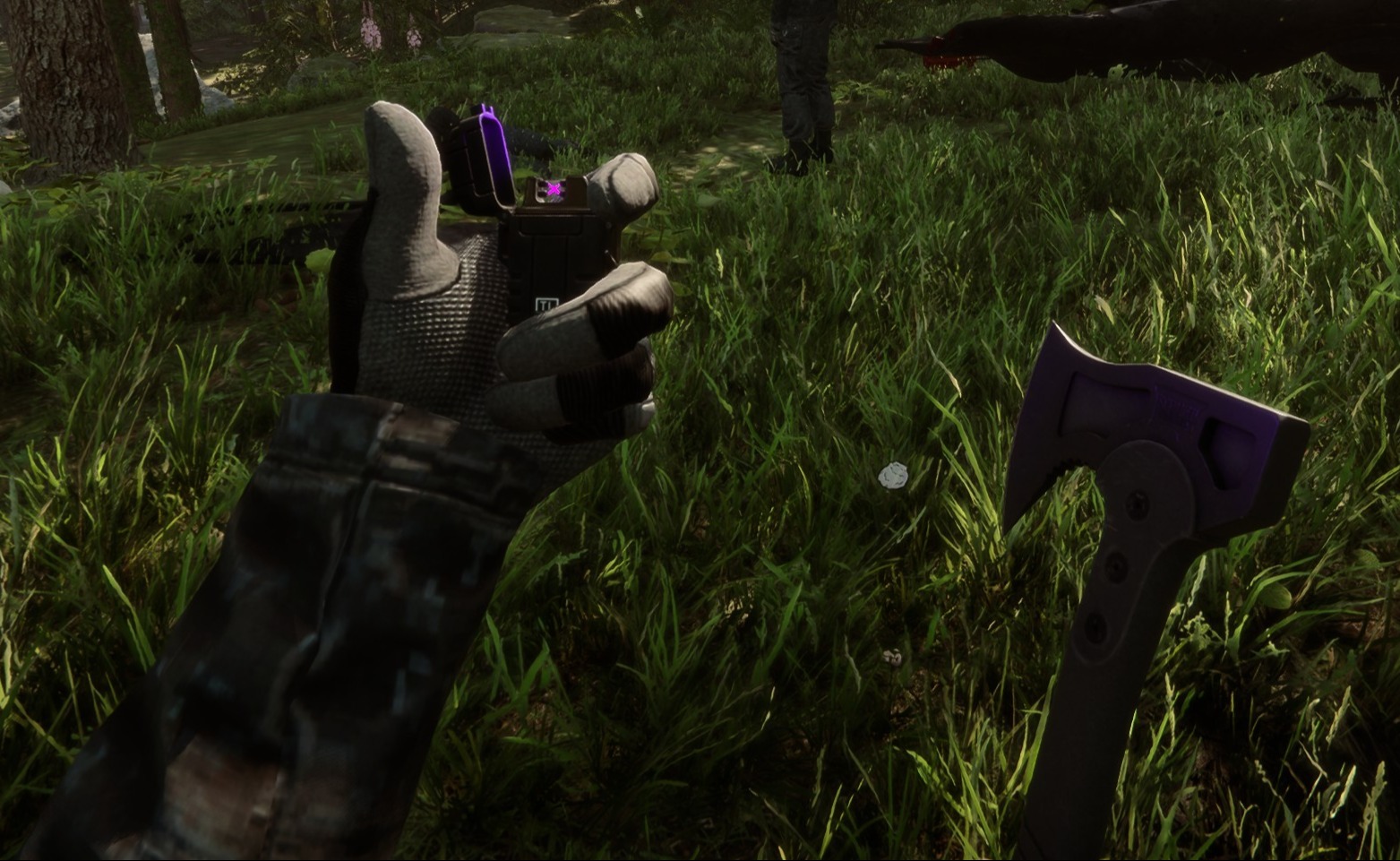
Tactical Gear Mod
Deze configureerbare client-side mod voegt tactische uitrusting toe aan jou en alle andere spelers in je game.
This configurable client-side mod adds tactical gear to you and any other players in your game.
Automatisch vertaald
clairenheit1367 Model Swap Versie:v1.1.6 Bijgewerkt op 28 dec 2025
- Downloads
- 16.025 in totaal
- Downloads deze week
- 150 deze week
- Volgers
- 2 volgers
v1.1.6 downloaden
Andere versies
Niet bevestigd Nog niet gecontroleerd op de nieuwste patch. Geprobeerd? Laat het weten. Meld of het werkt
Client · Alleen de host Alles bekijken
Overzicht
Veldnotities
Alle 21 versiesReviews
Nog geen reviews. Gedownload? Vertel als eerste hoe het ging.
Schrijf een review
Inloggen · Eén review per overlevende. Wees concreet: versie, wat werkte en wat niet.
Veelgestelde vragen
- Werkt Tactical Gear Mod in multiplayer?
- Ja, maar alleen de host hoeft het te installeren; de andere spelers kunnen zonder meedoen.
- Hoe installeer ik Tactical Gear Mod?
- Installeer RedLoader (RedManager kan dat voor je doen), download Tactical Gear Mod 1.1.6 via deze pagina en zet het in de map _RedLoader/Mods in je gamemap. Start de game en druk op F1 om te controleren of het geladen is.
- Wat heeft Tactical Gear Mod nodig?
- Alleen Sons of the Forest op Steam en RedLoader. Er zijn geen andere afhankelijkheden.
- Werkt Tactical Gear Mod met de huidige gamepatch?
- Er zijn nog geen compatibiliteitsmeldingen. Probeer je het, voeg dan een veldrapport toe.
In één oogopslag
- Gamebuild
- Niet bevestigd
- RedLoader
- Niet opgegeven
- Platform
- Client
- Multiplayer
- Alleen de host
- Dedicated server
- Onbekend
- Verwijderen midden in een save
- Onbekend
- Afhankelijkheden
- Geen
- Conflicten
- Geen bekend
- Versie
- 1.1.6
- Bijgewerkt
- Gepubliceerd
Veldrapporten
MeldenNog geen veldrapporten. Uitgeprobeerd? Laat het weten.
Werkte het in je game?
Een veldrapport kost tien seconden en vertelt iedereen of deze mod op de huidige patch werkt.
Log in om een veldrapport toe te voegen
14 reacties
Hello Herds, the settings are available in the main menu on the "Mods" option, not in file explorer.
I might be super stupid, but i cant find the settings in my file explorer to configurate the mod. can someone please help me
i I'm having a problem with the mod. When I save the game, exit, and re-enter, the mod stops working (the hands and clothing aren't visible, only the default game gear, and Kevin doesn't have his helmet or anything equipped). I don't know if anyone else has experienced this or is currently experiencing the same issue.
Oma, it's a 1 click install using RedModManager
Can you please explain how to install the mod?
The gloves were not designed for the player and required some unconventional fixes to make replace the player hands. The player hands are two meshes, one for each while the gloves are one mesh for both and do not include forearms. The gloves work best with the "old" jacket, as the new one is designed around the gloveless hands. You'll notice the old jacket option forces gloves on co-op players, as otherwise the forearms will violently clip with it.
wrists are invisible on other clothing when gloves are in use.
sleeves are thinner than usual, and taking off the gloves will result in the thin sleeves clipping through the normal player arms.
nvm fixed it by uninstalling all other mods. the mod is great althru gloves could be rigged bit better for less clipping
it does not work for me (
it makes my hands invisible
R0xxier0cks, the helmet and balaclava are set to cast shadows only for the local player as otherwise they would obstruct your camera view. The free-camera option is a debug tool and doesn't override this
Log in om te reageren