Tactical Gear Mod
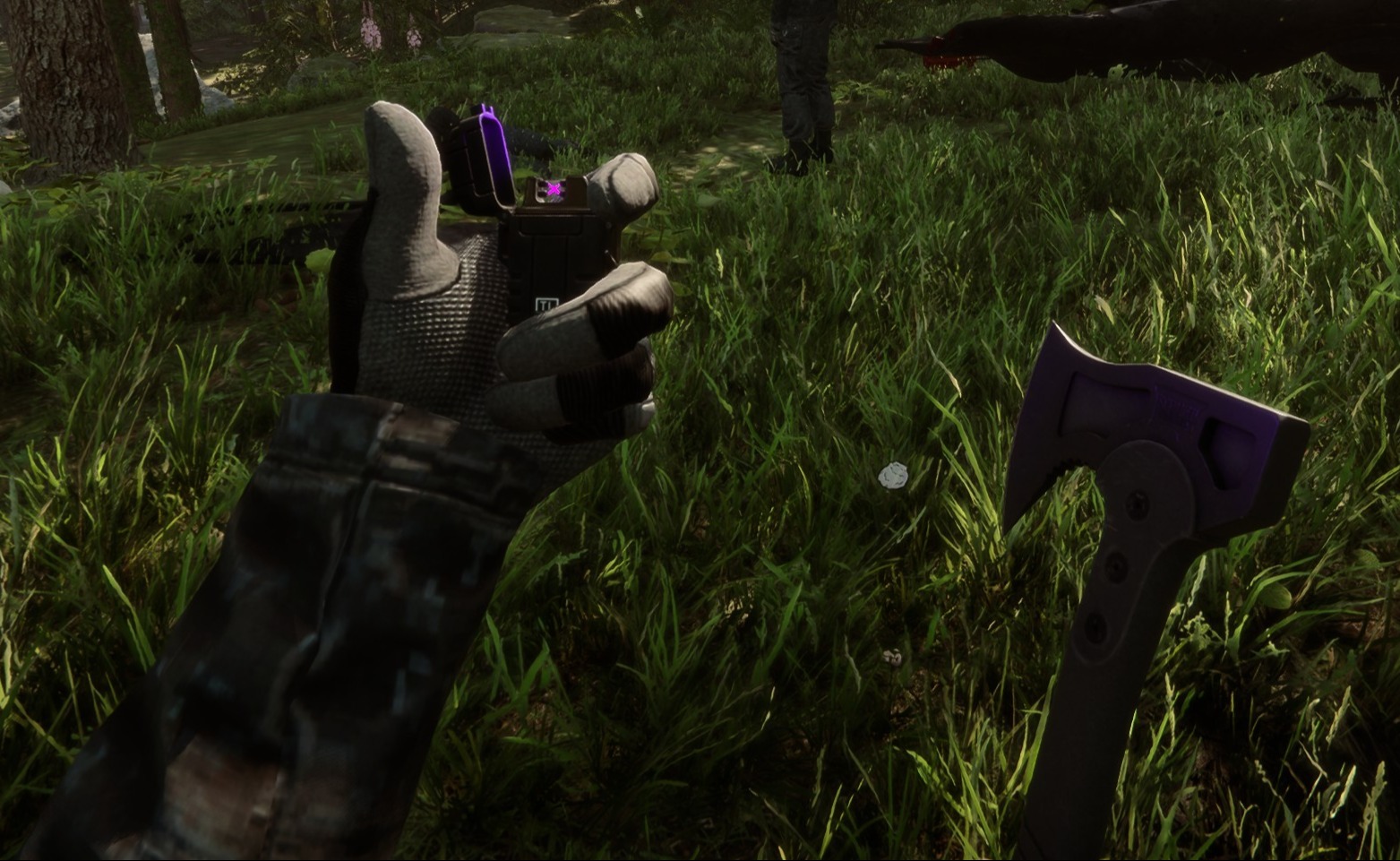
Questa mod configurabile lato client aggiunge equipaggiamento tattico a te e a qualsiasi altro giocatore nella tua partita.
This configurable client-side mod adds tactical gear to you and any other players in your game.
Tradotto automaticamente
clairenheit1367 Model Swap Versione:v1.1.6 Aggiornata il 28 dic 2025
- Download
- 16.025 in totale
- Download questa settimana
- 150 questa settimana
- Follower
- 2 follower
Altre versioni
Client · Solo l’host Vedi tutto
Panoramica
Note sul campo
Tutte le 21 versioniRecensioni
Ancora nessuna recensione. L’hai scaricata? Racconta per primo com’è andata.
Accedi · Una recensione per sopravvissuto. Sii preciso: versione, cosa ha funzionato e cosa no.
Domande frequenti
- Tactical Gear Mod funziona in multigiocatore?
- Sì, ma solo l’host deve installarlo; gli altri giocatori possono unirsi senza.
- Come si installa Tactical Gear Mod?
- Installa RedLoader (RedManager può farlo per te), scarica Tactical Gear Mod 1.1.6 da questa pagina e mettilo nella cartella _RedLoader/Mods della directory del gioco. Avvia il gioco e premi F1 per verificare che sia caricato.
- Di cosa ha bisogno Tactical Gear Mod?
- Solo di Sons of the Forest su Steam e di RedLoader. Non ha altre dipendenze.
- Tactical Gear Mod funziona con la patch attuale del gioco?
- Non ci sono ancora segnalazioni di compatibilità. Se lo provi, aggiungi un rapporto sul campo.
In breve
- Build del gioco
- Non verificato
- RedLoader
- Non dichiarato
- Piattaforma
- Client
- Multigiocatore
- Solo l’host
- Server dedicato
- Sconosciuto
- Rimozione a partita in corso
- Sconosciuto
- Dipendenze
- Nessuno
- Conflitti
- Nessuno noto
- Versione
- 1.1.6
- Aggiornata
- Pubblicata
Rapporti sul campo
SegnalaAncora nessun rapporto sul campo. L’hai provata? Faccelo sapere.
Ha funzionato nella tua partita?
Un rapporto sul campo richiede dieci secondi e dice a tutti se questa mod funziona con la patch attuale.
Accedi per aggiungere un rapporto sul campo
14 commenti
Hello Herds, the settings are available in the main menu on the "Mods" option, not in file explorer.
I might be super stupid, but i cant find the settings in my file explorer to configurate the mod. can someone please help me
i I'm having a problem with the mod. When I save the game, exit, and re-enter, the mod stops working (the hands and clothing aren't visible, only the default game gear, and Kevin doesn't have his helmet or anything equipped). I don't know if anyone else has experienced this or is currently experiencing the same issue.
Oma, it's a 1 click install using RedModManager
Can you please explain how to install the mod?
The gloves were not designed for the player and required some unconventional fixes to make replace the player hands. The player hands are two meshes, one for each while the gloves are one mesh for both and do not include forearms. The gloves work best with the "old" jacket, as the new one is designed around the gloveless hands. You'll notice the old jacket option forces gloves on co-op players, as otherwise the forearms will violently clip with it.
wrists are invisible on other clothing when gloves are in use.
sleeves are thinner than usual, and taking off the gloves will result in the thin sleeves clipping through the normal player arms.
nvm fixed it by uninstalling all other mods. the mod is great althru gloves could be rigged bit better for less clipping
it does not work for me (
it makes my hands invisible
R0xxier0cks, the helmet and balaclava are set to cast shadows only for the local player as otherwise they would obstruct your camera view. The free-camera option is a debug tool and doesn't override this
Accedi per commentare